
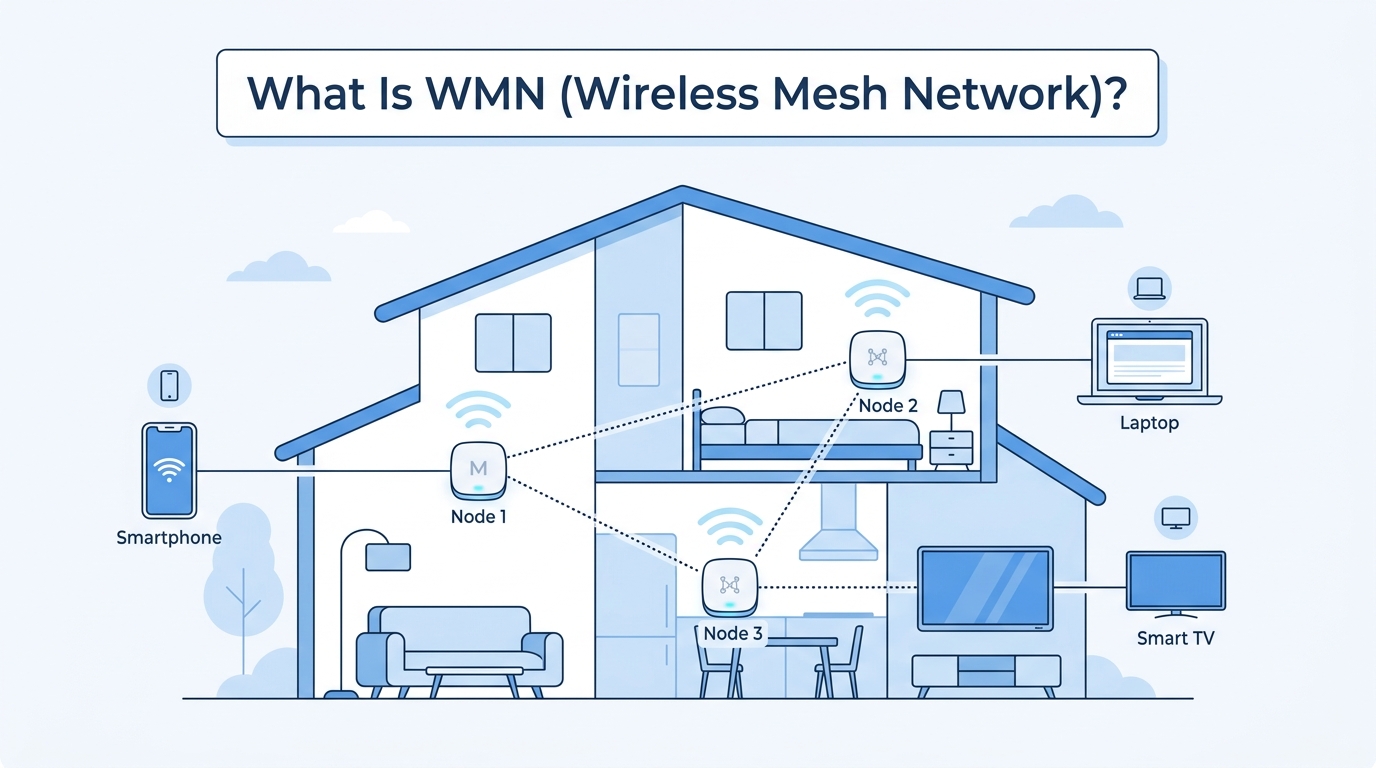
Have you ever walked into another room and suddenly lost your Wi-Fi signal? Maybe your video started buffering, your online game disconnected, or a video call froze at the worst possible moment. This happens because a traditional Wi-Fi router has a limited coverage area. The farther you move away from it, the weaker the signal becomes. Thick walls, multiple floors, and large buildings can make the problem even worse.
A Wireless Mesh Network (WMN) is designed to solve this problem. Instead of depending on just one router, it uses several wireless devices called mesh nodes. These nodes work together to create one large wireless network. Every node helps pass data to another node, giving you better coverage and a more reliable connection.
In this guide, you’ll learn not only what a Wireless Mesh Network is but also how it works, how it compares with regular Wi-Fi, its advantages and disadvantages, where it is used, and the common mistakes many online articles fail to explain.
What Does WMN Mean?
WMN stands for Wireless Mesh Network.
Let’s break down the name into simple parts.
- Wireless means devices communicate using radio signals instead of cables.
- Mesh means many devices connect to one another instead of relying on a single central device.
- Network means all these devices work together to share information.
Imagine a group of friends standing in a park. If one friend wants to send a message to another person who is far away, the message can be passed from one friend to the next until it reaches the right person. If one friend leaves, the others can still pass the message using another route. A Wireless Mesh Network works in a very similar way.
Each device in the network is called a mesh node. These nodes don’t just receive data—they can also send it and forward it to other nodes. Because of this, the network has several possible paths for information to travel.
This is one reason WMNs are known for being self-healing. If one node stops working, the network automatically looks for another available path. You usually don’t have to reconnect your devices or restart the whole network.
How Does a Wireless Mesh Network Work?
A Wireless Mesh Network works by allowing multiple wireless nodes to communicate directly with each other. Instead of sending every request to one central router, the network can choose different routes depending on which path is available and strongest.
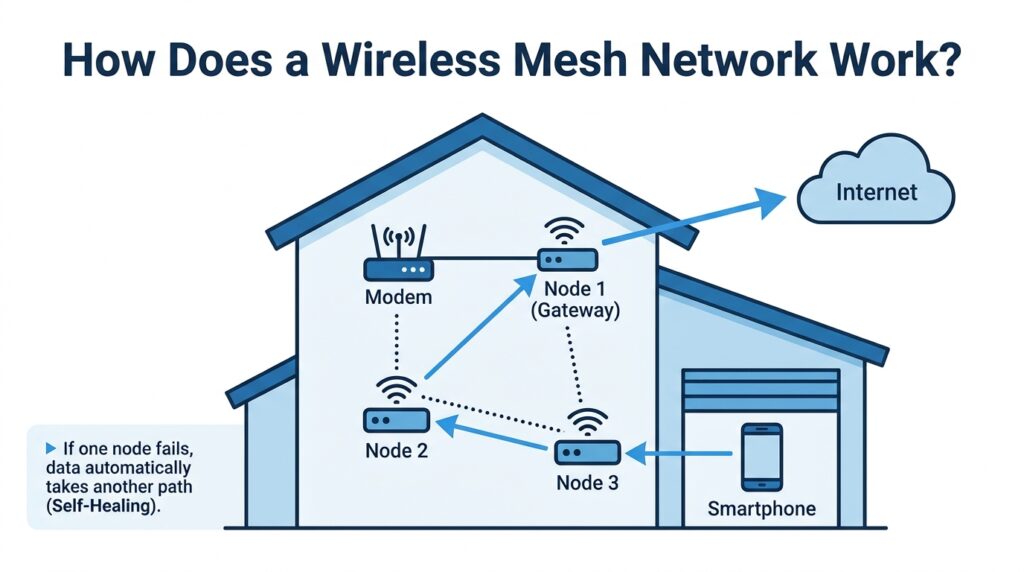
Imagine your house has three mesh nodes.
One node is in the living room.
Another is upstairs.
The third is in the garage.
When you use your phone in the garage, it doesn’t have to connect directly to the main router in the living room. Instead, it connects to the nearby garage node. That node may pass the data to the upstairs node, which then sends it to the gateway connected to your internet modem.
If the upstairs node suddenly loses power, the network doesn’t simply stop working. The garage node searches for another available path, perhaps communicating directly with the living room node instead. This ability to reroute traffic automatically is called self-healing.
The process happens so quickly that many users never notice it. That’s one of the biggest advantages of mesh networking over traditional Wi-Fi systems, where a single router often becomes a single point of failure.
Unlike some simplified explanations found online, the network doesn’t randomly choose a path. Modern WMNs use intelligent routing methods to select efficient routes based on signal quality, network congestion, and other factors.
How Data Travels Through the Network
When you open a website, your phone sends a request.
The request reaches the nearest mesh node.
That node checks the best available route.
The data then travels from node to node until it reaches the gateway connected to the internet.
When the website responds, the information travels back through the mesh network using the fastest available path.
Modern mesh systems perform this process automatically. Users don’t need to choose routes or configure anything manually.
This intelligent routing is one reason Wireless Mesh Networks perform well in places where traditional Wi-Fi struggles to maintain consistent coverage.
Main Components of a Wireless Mesh Network
To understand how a Wireless Mesh Network (WMN) works, you first need to know the role of each part of the network. Many websites simply list terms like mesh nodes, gateways, and clients without explaining what they actually do. For beginners, that can be confusing. Think of a WMN like a team where every member has a different responsibility. When everyone works together, the network becomes faster, more reliable, and easier to expand.
The three main components of a Wireless Mesh Network are:
- Mesh Nodes
- Gateway Node
- Client Devices
Mesh Nodes
Mesh nodes are the heart of a Wireless Mesh Network. They are the devices that make the “mesh” possible. Unlike a traditional Wi-Fi extender, which simply repeats a signal, a mesh node can receive, process, and forward data to other nodes. This creates multiple possible routes for information to travel.
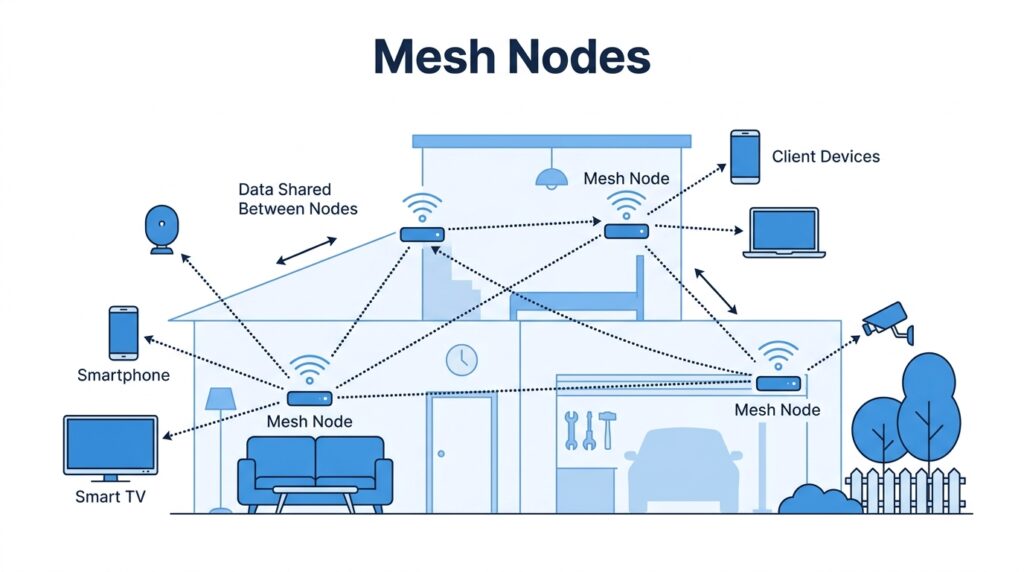
Imagine you are passing a package across a neighborhood. Instead of relying on one person to deliver it, several neighbors help move it closer to its destination. If one neighbor isn’t home, another can take over. That’s exactly how mesh nodes work.
Each node has several important jobs:
- Receive data from another node.
- Send data to nearby nodes.
- Extend the wireless coverage area.
- Help find the best route for network traffic.
Modern mesh systems also monitor network conditions continuously. If one path becomes busy or a node fails, they can choose another route automatically. This feature, known as self-healing, helps maintain a stable connection without requiring users to manually reconnect their devices.
Gateway Node
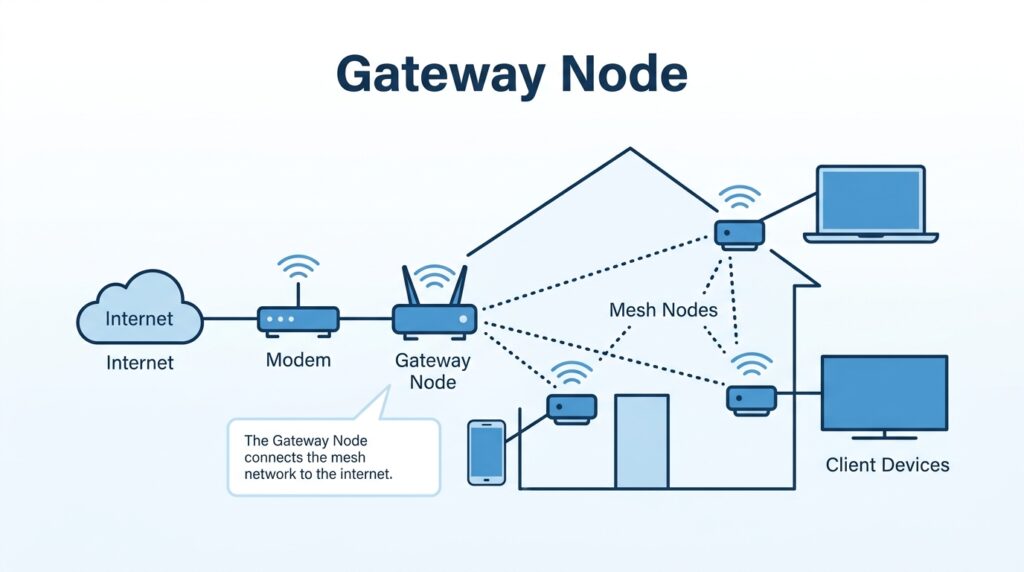
The mesh itself is decentralized, most internet-connected WMNs still include a gateway node. This is the device that connects the mesh network to your modem or Internet Service Provider (ISP). Without it, devices inside the mesh could communicate with each other, but they would not be able to access websites, stream videos, or use online services.
Think of the gateway as the main entrance to a city. Inside the city, people can move freely between streets. However, anyone who wants to enter or leave the city usually passes through one of its main entrances. The gateway performs a similar role by connecting the local mesh network to the wider internet.
Large organizations sometimes use multiple gateway nodes instead of just one. This improves reliability because if one internet connection fails, another gateway can continue providing access.
Client Devices
Client devices are the gadgets that people use every day. These devices don’t manage the mesh network—they simply connect to it to send and receive data.
Examples include:
- Smartphones
- Laptops
- Desktop computers
- Tablets
- Smart TVs
- Gaming consoles
- Security cameras
- Smart speakers
- Smart home appliances
- IoT sensors
A client device usually connects to the nearest or strongest mesh node. If you walk from your living room to your bedroom, your phone can automatically switch to a closer node without interrupting your connection. This process is called roaming, and it helps create a seamless experience throughout your home or office.
Many people assume their phone is connected directly to the internet. In reality, it communicates with a nearby mesh node first. That node then forwards the data through the network until it reaches the gateway and the internet.
The result is a smoother connection, fewer dead zones, and better performance as you move around the coverage area.
What Is Wireless Backhaul?
One topic that many beginner articles completely skip is wireless backhaul, even though it has a major impact on network performance.
Backhaul simply means how mesh nodes communicate with one another.
Think of a railway system. Passengers travel on local trains, but those trains also need tracks connecting the stations. In a mesh network, the backhaul acts like those tracks, carrying data between nodes.
There are two common types of backhaul:
Wireless Backhaul
In this setup, mesh nodes communicate using Wi-Fi or another wireless technology. No Ethernet cables are required, making installation simple and flexible.
This is the most common option for home mesh Wi-Fi systems because it avoids running cables through walls or ceilings.
Wired Backhaul
Here, the mesh nodes are connected using Ethernet cables. Wireless devices still connect to the nodes over Wi-Fi, but the nodes themselves exchange data through wired connections.
A wired backhaul usually provides:
- Higher speeds
- Lower latency
- Greater stability
- Less wireless interference
Many premium home mesh systems support both wired and wireless backhaul, allowing users to choose the option that best suits their environment.
Some high-end systems also include a dedicated wireless backhaul radio. This means one wireless band is reserved only for communication between mesh nodes, while the remaining bands are available for user devices. As a result, overall performance is often better than systems where all traffic shares the same wireless channel.
Understanding backhaul helps explain why two mesh systems with similar specifications may perform very differently in real-world use.
Types of Mesh Topology
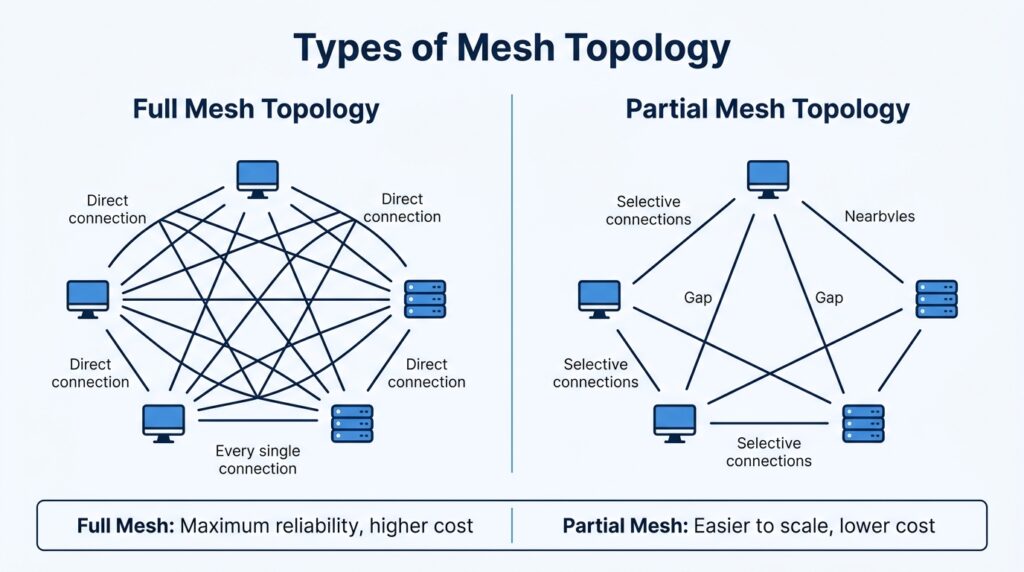
Many articles explain that a Wireless Mesh Network uses a mesh topology, but they stop there. For beginners, that doesn’t answer an important question: What does a mesh topology actually look like? Understanding the different types of mesh topology makes it much easier to see why mesh networks are reliable and how they differ from traditional Wi-Fi systems.
A mesh topology describes how the nodes in a network are connected. Instead of every device relying on one central router, nodes communicate with one another and can pass data through different routes. This creates flexibility because there is usually more than one path available.
There are two main types of mesh topology.
Full Mesh Topology
In a full mesh topology, every node has a direct connection to every other node in the network. This creates the highest level of reliability because there are many different paths available for data to travel.
Imagine a group of five friends where each friend has the phone number of every other friend. If one person is unavailable, the message can still reach its destination through someone else. There are many alternative routes, so communication rarely stops.
The biggest advantage of a full mesh network is maximum redundancy. Even if several connections fail, data can usually find another route.
However, there is also a downside. As more nodes are added, the number of required connections increases very quickly. This makes a full mesh network expensive and difficult to manage, especially in large deployments.
For this reason, full mesh topologies are generally used only in smaller networks or in situations where extremely high reliability is required.
Partial Mesh Topology
A partial mesh topology is much more common in real-world Wireless Mesh Networks.
Instead of connecting every node to every other node, each node connects only to nearby or selected nodes. Even though not every device has a direct connection, there are still multiple possible routes available for data.
Think about a city road system. Not every street connects directly to every other street, yet drivers can still reach almost any destination by following different roads. That’s exactly how a partial mesh network works.
Most home mesh Wi-Fi systems use a partial mesh because it offers an excellent balance between performance, cost, and simplicity.
Large businesses, factories, schools, hospitals, and smart cities also commonly use partial mesh networks because they are easier to expand. When a new building is added, administrators simply install another mesh node instead of redesigning the entire network.
Which Topology Is Better?
There isn’t one perfect answer because it depends on the situation.
| Feature | Full Mesh | Partial Mesh |
|---|---|---|
| Reliability | Excellent | Very Good |
| Cost | High | Lower |
| Installation | Complex | Easier |
| Scalability | Limited | Excellent |
| Most Common | Small specialized networks | Homes, businesses, smart cities |
This is another topic that many competing articles barely mention. Simply stating that a WMN uses a “mesh topology” doesn’t help readers understand the practical differences. Explaining full mesh and partial mesh gives beginners a much clearer picture of how real-world mesh networks are designed.
Advantages of a Wireless Mesh Network
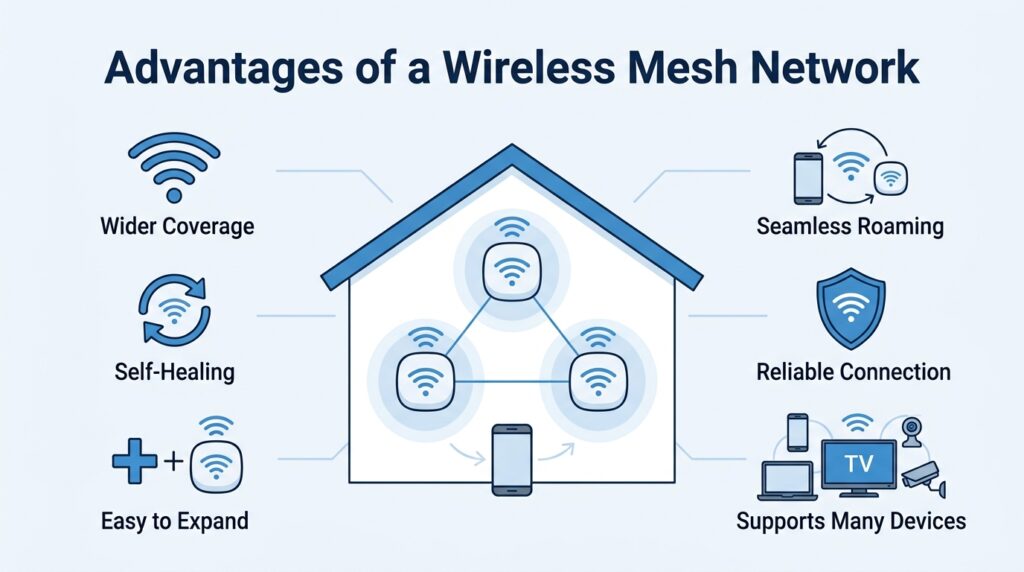
Wireless Mesh Networks have become popular because they solve many problems that traditional Wi-Fi networks struggle with. However, many websites simply list a few advantages without explaining why these benefits matter in everyday life. Let’s look at the most important advantages in simple terms.
1. Better Wi-Fi Coverage
One of the biggest reasons people buy a mesh system is to eliminate dead zones.
With a traditional router, the Wi-Fi signal becomes weaker as you move farther away. Thick walls, multiple floors, and large furniture can reduce the signal even more.
A mesh network places several nodes throughout the building. Since your device connects to the nearest node instead of a distant router, the signal remains stronger in more areas.
This is why mesh systems work especially well in:
- Large homes
- Two-story houses
- Office buildings
- Schools
- Warehouses
2. Self-Healing Network
One of the smartest features of a WMN is its ability to heal itself.
Suppose one mesh node suddenly loses power.
In a traditional network, devices connected to that router or extender might immediately lose access.
In a mesh network, nearby nodes search for another available route. Data is automatically redirected without requiring users to manually reconnect.
Although this process may take a short moment, it greatly improves overall reliability.
3. Easy to Expand
Many articles correctly mention that WMNs are scalable, but they rarely explain what that means in practice.
Suppose you move into a larger home.
Instead of replacing your existing router, you simply purchase another compatible mesh node and add it to the network.
The new node immediately becomes part of the existing mesh and helps extend coverage.
This flexibility makes WMNs an excellent choice for growing homes and businesses.
4. Better Roaming
With a traditional router and Wi-Fi extenders, your phone sometimes remains connected to a weak signal even after you’ve moved closer to another access point.
Mesh systems are designed to make roaming much smoother.
As you walk around your home, your smartphone automatically switches to the strongest available node.
The transition usually happens without interrupting video calls, music streaming, or online gaming.
5. Reliable Network Performance
Because several communication paths exist, the network can continue working even when one route becomes unavailable.
Imagine driving to work.
If your usual road is closed, you simply choose another street.
A Wireless Mesh Network behaves in much the same way.
Instead of depending on one path, data can often travel through several different routes until it reaches its destination.
6. Supports Many Connected Devices
Modern homes often contain dozens of internet-connected devices.
These include:
- Smartphones
- Laptops
- Smart TVs
- Security cameras
- Video doorbells
- Smart lights
- Smart speakers
- Thermostats
A properly designed mesh network distributes wireless coverage more effectively across the home, helping these devices maintain stable connections.
7. Flexible Installation
Unlike wired networks, many WMNs require very little cabling.
This makes them useful in locations where running Ethernet cables would be difficult or expensive.
Examples include:
- Historic buildings
- Outdoor parks
- Construction sites
- Warehouses
- Temporary event locations
8. Supports Modern Smart Cities
One advantage rarely discussed in consumer-focused articles is the role of WMNs in smart city infrastructure.
Cities use mesh networks to connect:
- Traffic signals
- Public Wi-Fi
- Environmental sensors
- Parking systems
- Security cameras
- Street lighting
Since nodes cooperate with one another, city officials can cover large outdoor areas without installing cables everywhere.
This shows that Wireless Mesh Networks are much more than home Wi-Fi products—they are a key technology for modern digital infrastructure.
Disadvantages of a Wireless Mesh Network
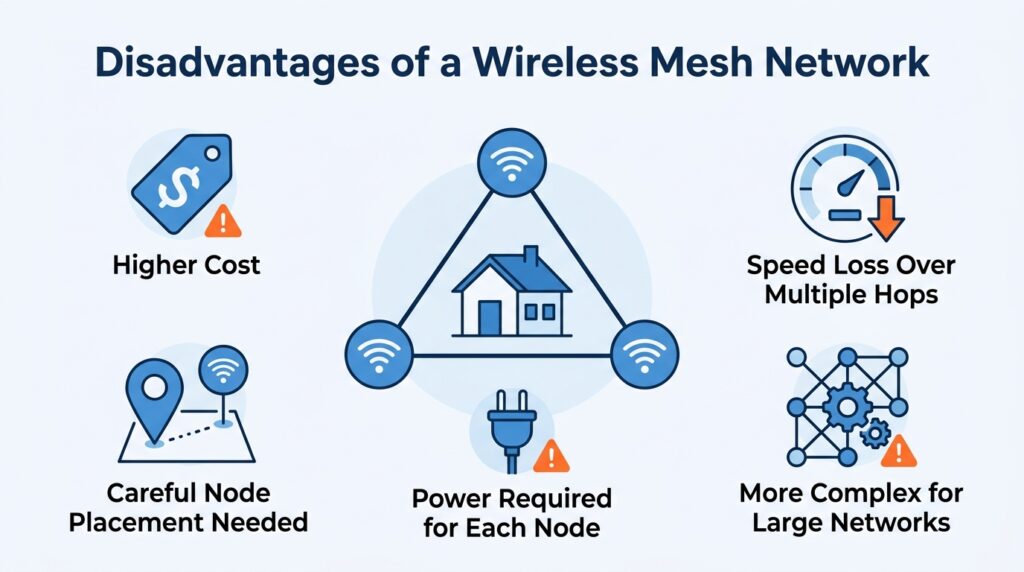
Although Wireless Mesh Networks offer many benefits, they are not perfect. Some websites focus only on the advantages and ignore the limitations, which can lead readers to believe that mesh networking is always the best solution. In reality, every technology has trade-offs, and understanding them helps you make a better decision.
Higher Initial Cost
A mesh system usually costs more than buying a single traditional router. Instead of purchasing one device, you often need two, three, or even more mesh nodes to cover a large area.
For a small apartment, this extra cost may not provide enough additional value.
Performance Can Decrease Across Multiple Wireless Hops
One of the biggest misconceptions is that mesh networking always increases internet speed.
The truth is that a mesh network mainly improves coverage and reliability, not necessarily speed.
When data passes through several wireless nodes before reaching the gateway, each additional hop can introduce a small amount of latency and reduce throughput. Modern systems with dedicated wireless backhaul or wired Ethernet backhaul greatly reduce this issue, but it’s still important to understand that mesh networking isn’t a magic speed booster.
Node Placement Matters
Some people think they can place mesh nodes anywhere.
Unfortunately, that’s not how it works.
If nodes are placed too close together, they may interfere with one another.
If they’re too far apart, the connection between nodes becomes weak.
Careful placement is essential for achieving the best possible performance.
Power Requirements
Each mesh node needs a power source.
Unlike passive devices, every node must remain powered to participate in the network.
For outdoor deployments, organizations sometimes use battery systems or solar panels, but this adds cost and maintenance.
More Complex for Large Networks
Installing a two-node mesh system at home is relatively easy.
Designing a city-wide Wireless Mesh Network is much more complicated.
Engineers must carefully plan:
- Coverage
- Channel selection
- Interference
- Capacity
- Security
- Gateway placement
- Network management
This is why enterprise WMNs require professional design and monitoring.
How to Place Mesh Nodes Correctly?
Many websites encourage users to buy more mesh nodes but rarely explain where to place them. In reality, proper placement has a greater impact on performance than simply increasing the number of devices.
Think of mesh nodes as people having a conversation. If they stand too far apart, they can’t hear each other clearly. If they stand too close together, they don’t cover much additional area. The goal is to position them so they communicate well while extending coverage to new locations.
Here are some practical tips.
Place the First Node Near the Internet Connection
The primary node or gateway should be connected to your modem and placed in an open location whenever possible.
Avoid hiding it inside cabinets or behind large furniture.
Keep Nodes Within Good Signal Range
Every mesh node should still receive a strong signal from another node.
If you place one too far away, it won’t have a reliable connection to forward data.
A weak connection between nodes often causes slow speeds and unstable performance.
Avoid Thick Obstacles
Concrete walls, metal structures, elevators, and large appliances can weaken wireless signals.
Whenever possible, position nodes where they have a relatively clear path to one another.
Don’t Place Too Many Nodes Together
This is another misconception found in many articles.
More nodes do not always mean better performance.
Too many nodes placed close together can create unnecessary interference and increase network complexity.
Always follow the manufacturer’s recommended spacing.
Use Wired Backhaul When Possible
If Ethernet cabling is available, connecting mesh nodes using wired backhaul often provides:
- Higher speeds
- Lower latency
- Better stability
- Reduced wireless congestion
Many modern mesh systems automatically use Ethernet when it is available.
Test Before Final Installation
After placing your nodes, walk around your home or office while testing:
- Signal strength
- Internet speed
- Video streaming
- Video calls
If performance drops in certain areas, adjusting the location of a node by even a few feet can sometimes make a noticeable difference.
Proper placement is one of the easiest ways to improve a Wireless Mesh Network without buying additional hardware.
Security in Wireless Mesh Networks
Security is one of the most overlooked topics in many articles about Wireless Mesh Networks. Most guides focus on coverage, speed, and convenience but spend little time explaining how to keep the network safe. A strong wireless network is useful only if it also protects your personal information, connected devices, and online activities.
Like any wireless technology, a WMN can become a target for unauthorized access if it is not configured properly. The good news is that modern mesh systems include several security features that make them much safer than older wireless networks. By understanding these features and following a few best practices, you can greatly reduce security risks.
Use Strong Encryption
Encryption protects the information that travels between your devices and the mesh network.
Today, most modern mesh Wi-Fi systems support:
- WPA3 (recommended)
- WPA2 (still widely used)
WPA3 offers stronger protection against password guessing attacks and provides better security for public and private networks. If your devices support WPA3, it’s usually the best option to enable.
Create a Strong Password
Many people still use simple passwords like:
- 12345678
- password
- admin123
These passwords are easy for attackers to guess.
Instead, choose a password that combines:
- Uppercase letters
- Lowercase letters
- Numbers
- Special characters
A longer password is generally much more secure than a short one.
Keep Firmware Updated
Manufacturers regularly release firmware updates.
These updates may:
- Fix security vulnerabilities
- Improve stability
- Add new features
- Increase compatibility
Many modern mesh systems can install updates automatically, which helps keep the network protected without requiring much effort from the user.
Use a Guest Network
If visitors need internet access, avoid giving them your main Wi-Fi password.
Instead, create a guest network.
This separates guest devices from your personal computers, smart home equipment, and private files.
Many mesh systems allow you to enable or disable the guest network with just a few clicks.
Monitor Connected Devices
Most mesh Wi-Fi apps let you see every device connected to your network.
Regularly reviewing this list helps you identify:
- Unknown devices
- Old devices you no longer use
- Unauthorized connections
If you notice an unfamiliar device, you can usually disconnect it directly from the app.
Enterprise Security
Large businesses and organizations often require stronger security than a typical home.
Enterprise Wireless Mesh Networks may include:
- User authentication systems
- Digital certificates
- Network segmentation
- Centralized security monitoring
- Advanced intrusion detection
These extra protections help secure networks that support hundreds or even thousands of connected devices.
Security is not something you set up once and forget. Regular updates, strong passwords, and good network management are essential for keeping a Wireless Mesh Network safe.
Should You Buy a Mesh Wi-Fi System?
Now that you understand how Wireless Mesh Networks work, the next question is simple:
Is a mesh Wi-Fi system the right choice for you?
The answer depends on your home, your internet usage, and your budget.
A mesh Wi-Fi system is usually a good investment if:
- Your home has multiple floors.
- You experience Wi-Fi dead zones.
- You own many smart home devices.
- Several people stream videos or attend online meetings at the same time.
- Running Ethernet cables is difficult.
On the other hand, a traditional router may be sufficient if:
- You live in a small apartment.
- Every room already receives a strong Wi-Fi signal.
- Only a few devices connect to the network.
- You have a limited budget.
Before buying, consider:
| Question | If Yes |
|---|---|
| Do you have Wi-Fi dead spots? | Consider mesh Wi-Fi. |
| Is your home larger than about 2,000 square feet (185 square meters)? | A mesh system may provide better coverage. |
| Do you use many smart home devices? | Mesh networking can improve reliability. |
| Can you run Ethernet cables? | A wired backhaul can improve performance. |
| Does your current router already cover your home well? | You may not need a mesh system. |
Choosing the right solution isn’t about buying the most expensive equipment. It’s about selecting the technology that matches your needs. For many people, a high-quality router is enough. For others, especially in larger or more complex buildings, a Wireless Mesh Network provides a noticeable improvement in coverage, reliability, and convenience.
Conclusion
A Wireless Mesh Network (WMN) is much more than a collection of Wi-Fi devices. It is a networking architecture that allows multiple wireless nodes to work together, creating reliable communication through several possible paths. This design reduces dead zones, improves coverage, and keeps the network operating even when one node becomes unavailable.
Many articles explain only the basic definition of a WMN, leaving readers with an incomplete picture. In this guide, we’ve gone beyond the basics by covering topics that are often overlooked, including the difference between WMNs and mesh Wi-Fi, the importance of wireless backhaul, gateway nodes, full and partial mesh topologies, security, node placement, and the practical limitations of mesh networking. Understanding these concepts helps you make informed decisions instead of relying on common misconceptions.
Whether you’re improving Wi-Fi in your home, designing a business network, or simply learning how modern wireless communication works, knowing the strengths and limitations of Wireless Mesh Networks will help you choose the right solution for your environment. The best network isn’t necessarily the most expensive one—it’s the one that provides reliable coverage, meets your needs, and is designed correctly.
Atlas Paragon Small Business Operations & Security Guides
Independent, evidence-backed checklists for small-business software selection, accounting workflows, and security.