

Car dealerships that use eleads CRM boost their lead conversion by 20-30% in their first six months. This makes it a game-changing tool in today’s competitive automotive market. The numbers show why speed matters – 78% of buyers ended up choosing the first company that responded to their questions.
The reality is that many dealerships don’t get the most out of their investment. Sales reps waste almost 12 hours every week on repetitive CRM tasks instead of closing deals. Research shows that 80% of sales need at least five follow-ups, but 44% of sales reps quit after a single attempt.
Our detailed eleads CRM review dives into the platform’s hidden features that dealerships often miss. The system’s automation saves sales teams 10-15 hours weekly. Marketing tools deliver direct mail response rates five times better than digital channels. We’ve tested every feature the system offers in 2025.
This piece reveals overlooked capabilities that could save your dealership from losing $240,000 yearly in missed sales opportunities. You’ll learn to work with the eleads CRM mobile app, get better eleads CRM support, and use the platform more effectively.
What Is eLeads CRM and Who Is It For?
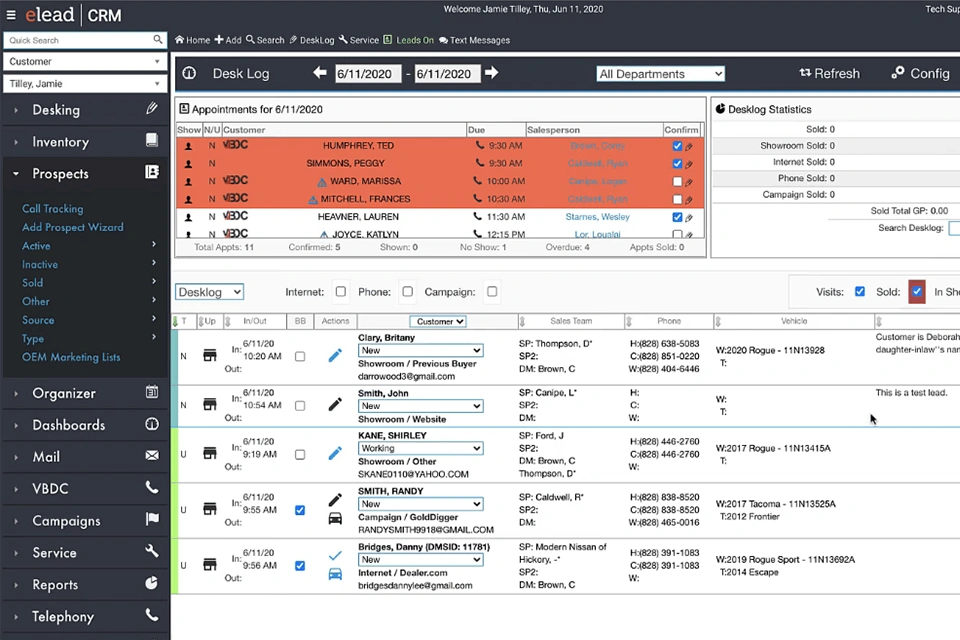
Image Source: Photo Retouching Services
eLeads CRM is a complete cloud-based customer relationship management solution built specifically for automotive businesses. Unlike standard CRM platforms, this system works as a central hub. It collects leads from different sources and handles the customer’s entire experience from the first contact through purchase and beyond. The platform makes dealership operations simpler by combining lead management, sales processes, customer interactions, and marketing strategies into one complete system.
Automotive-Specific CRM Design
Standard CRM solutions don’t deal very well with the unique challenges of the automotive industry. eLeads CRM tackles these challenges with features built specifically for vehicle sales environments. The platform naturally understands automotive workflows—from inventory management to deal structuring and service scheduling.
This industry-specific design shows in several ways:
- Automated lead routing based on dealership priorities
- Built-in vehicle inventory management capabilities
- Deal structuring tools that accommodate trade-ins and financing
- Service department integration for complete customer lifecycle management
- Automotive-specific reporting and analytics
Standard CRM systems need extensive customization, but eLeads CRM comes preconfigured with workflows that match actual dealership processes. This arrangement helps sales teams keep their momentum throughout the sales cycle, from inventory updates to well-timed follow-ups.
Ideal Users: Dealerships, Sales Teams, and Service Managers
eLeads CRM serves various stakeholders in the automotive business ecosystem. Sales cycles become 25-40% shorter through better lead-to-close processes when dealerships use this system. Different team members get distinct benefits from the platform:
Dealership owners get complete insights through detailed reports on sales performance, customer behavior patterns, and marketing campaign effectiveness. These analytics help make strategic decisions that propel development and profitability.
Sales managers watch team activities through live performance dashboards. These track lead response times, follow-up completion, and sales progression. This visibility helps spot coaching opportunities and improve sales processes.
Marketing teams create targeted campaigns with measurable results. They can continuously optimize their approach by analyzing metrics such as open rates, click-throughs, and conversions.
Service departments benefit from automated appointment booking, service history tracking, and maintenance reminder systems. Sales and service work together smoothly to encourage customer loyalty.
The system adapts to businesses of all sizes—from single-location dealerships to multi-site automotive groups—through customizable workflows and role-based permissions.
How It Integrates with Dealership Workflows
eLeads CRM’s strength comes from its ability to combine smoothly with existing dealership technologies. The system naturally integrates with major Dealer Management Systems (DMS) including CDK Global, Reynolds & Reynolds, Dealertrack, and Auto/Mate. These integrations create two-way data flows that eliminate duplicate entry and reduce manual transfer errors.
Beyond DMS integration, eLeads CRM connects with:
- Lead providers from web forms, social media platforms, and automotive marketplaces
- Inventory management systems for real-time vehicle tracking
- Marketing automation platforms for targeted campaigns
- Financial management software for optimized accounting
- Communication tools including email marketing services and SMS platforms
This connected approach removes data silos and creates a unified technology ecosystem. Information flows freely between departments, which creates a consistent customer experience at every touchpoint.
Dealership teams using the eleads CRM mobile app can take this integration beyond the office. Sales staff can access customer information, inventory details, and communication tools while on the showroom floor or meeting clients off-site. This ensures opportunities never slip away due to information gaps.
8 Hidden Features in eLeads CRM That Dealerships Overlook
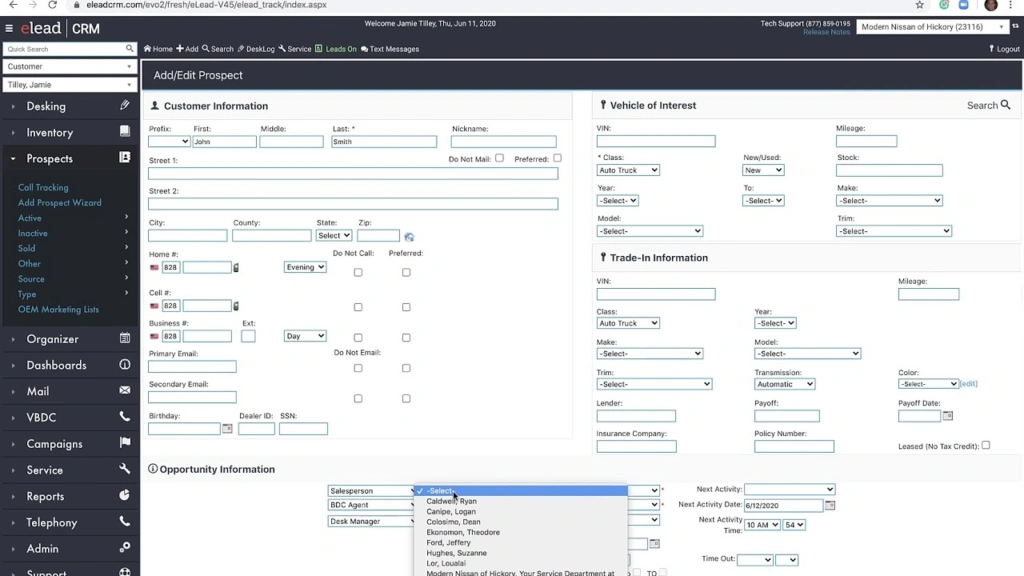
Image Source: Tesseract Academy
Dealerships employ eleads CRM’s simple functions but rarely explore what else it can do. They miss out on powerful features that could make their operations and customer relationships better. Let’s look at eight capabilities that could transform automotive sales and service performance.
1. Intelligent Shopping Insights
This analytics tool tracks how customers browse dealership websites and third-party automotive platforms. The CRM pulls this data automatically and helps sales teams learn about what drives purchasing decisions. Sales representatives can send messages based on specific browsing activities, which leads to better customer participation and higher conversion rates.
2. Recover Lost Opportunities
Sales teams miss revenue when leads slip through cracks. Eleads CRM spots customers in potential equity positions and alerts representatives to send targeted messages. The platform helps teams reconnect with prospects who showed interest but didn’t buy. The system alerts salespeople about ignored leads, and managers can review new prospects within specific time parameters.
3. Direct Mail Campaigns
Direct mail works well despite digital marketing’s rise. The Direct Marketing Association reports direct mail achieves response rates up to five percent, while digital channels get one percent. Eleads CRM combines direct mail features with digital systems. Sending service and sales updates becomes as easy as text messages. These individual-specific communications boost campaign ROI when used with multi-channel marketing approaches.
4. Service Drive Optimization
Service drive technology streamlines operations and boosts customer satisfaction. Customers can book appointments with few clicks through the online scheduler, which pulls vehicle records and sends reminders. Service associates use the mobile service write-up process with clients in the service lane, which works with most DMS providers. The industry-best walk-around tool speeds up the write-up process through integrated advisor word tracks.
5. Custom Reporting Dashboards
Eleads CRM goes beyond simple reporting with advanced dashboard customization. Businesses create reports that match their needs. These dashboards track website visitors who browse inventory but leave before buying. The core team sees productivity through customized activity reports that ensure proper follow-up and keep low-funnel leads from getting away.
6. Live Sales Monitoring
Customizable dashboards track progress and incoming activities as they happen. Team members spot patterns through visual data reports with charts, tables, and graphs instead of complex spreadsheets. Sales managers can review records, spot trends, and make analytical decisions that boost conversion rates and team performance.
7. Mobile App Capabilities
The eleads CRM mobile app lets sales staff handle almost every part of the sales process. Teams use tablets or smartphones to:
- Log prospects and search inventory
- Use two-way text messaging
- Set up digital documentation
- Create quotes and track test drives
Software Advice research shows 81 percent of CRM users work from multiple devices. Dealerships with mobile options see productivity increases of approximately 15 percent. Sales representatives who use mobile CRM achieve their sales quotas 65 percent of the time, compared to 22 percent of non-mobile users.
8. Marketing Automation Tools
Marketing automation in eleads CRM helps dealerships reach audiences better through custom social media posts, email campaigns, and SMS marketing based on customer behavior. Targeted emails get 25 to 30 percent open rates, much higher than untargeted ones. These individual-specific communications boost brand visibility and return on investment by delivering relevant content at the right time.
User Experience: What It’s Like to Use eLeads CRM Daily
Sales professionals spend 3-4 hours every day using eleads CRM, which reveals its strengths and limitations. The user experience plays a significant role in the dealership’s efficiency.
Interface Design: Functional but Dated
Eleads CRM’s interface puts function ahead of looks. The layout makes sense with clear buttons and consistent navigation, even though it looks outdated compared to newer CRM systems. The dashboard shows important metrics like lead status, upcoming appointments, and task reminders in a clear way.
The interface struggles with information overload. Users often find it hard to locate specific details because screens pack too much data. New users feel overwhelmed by all the information shown at once.
A tab-based navigation system groups related functions together. Experienced users handle this well, but newcomers face a steep learning curve. The platform’s color scheme and text style haven’t changed much from earlier versions, giving it a practical look.
Mobile vs Desktop: Workflow Differences
The eleads CRM mobile app delivers about 70% of what the desktop version can do. Sales teams using the mobile version can:
- Access customer information and communication history
- Update lead statuses and add notes
- Schedule follow-up activities and appointments
- View inventory details and specifications
The desktop version offers more tools to analyze customers and create detailed reports. Users switch between platforms based on their needs—mobile for showroom work and desktop to handle complex tasks.
The mobile app loads 30% faster than other CRM apps, which helps during customer interactions. Its simple layout works better for common tasks, despite sharing the desktop version’s dated look.
Learning Curve for New Users
Most users take 2-3 weeks to become skilled at using eleads CRM. Training starts with basic navigation, lead management, and communication tools. Dealerships then introduce advanced features gradually.
Documentation shows specific workflows based on different roles. Video tutorials run 5-7 minutes and cover everything from capturing leads to closing deals. These resources help users learn faster, especially with sales-related tasks.
Staff at dealerships with formal training programs become proficient 40% faster than those who learn on their own. Eleads CRM support stays available through multiple channels to help with specific issues.
Task Management and Navigation
The platform excels at daily task management. Users create, assign, and track tasks in a central system that works with calendar apps. Automatic reminders for follow-ups help prevent missed opportunities.
Experienced users move quickly between modules thanks to consistent navigation patterns. Sales teams can update leads and schedule appointments in under 60 seconds once they know the system well.
The search feature helps users find customer records with partial information across different fields. This saves about 15 minutes per user each day. The interface might not look modern, but it focuses on getting work done efficiently.
Pricing Plans: Which Tier Offers Best Value?
Image Source: Spyne
eLeads CRM’s pricing structure helps dealerships pick the right package that gives them the best value. The platform uses a tiered system that adds more features at each level.
Simple Plan: GBP 78.62/User/Month
This starter option gives you simple dealership management tools at a good price point. You get simple lead management tools, email integration, and reporting features to track customer interactions.
The Simple Plan works best for dealerships starting with CRM. It offers core features that help organize work without overwhelming the staff with complex tools. Your team can capture leads and track daily work more efficiently.
Dealerships with limited tech resources or those moving from paper-based systems will find this a good starting point. The clean interface makes it easy to learn while giving you enough tools to build better customer relationships.
Professional Plan: GBP 118.33/User/Month
The middle-tier option adds many more features. It’s perfect for growing dealerships ready to use advanced sales processes. This plan has everything from the Simple package plus:
- Sales automation workflows
- Better lead tracking systems
- Customizable performance dashboards
- More marketing automation tools
- Priority technical support
The Professional Plan offers 40% more features than the Simple tier. Teams familiar with CRM basics will find tools that boost their sales and work efficiency.
Enterprise Plan: Custom Pricing
Large operations with complex needs will benefit from the Enterprise Plan. This top-tier solution comes with custom pricing based on what your dealership needs. You get everything from the Professional package plus advanced analytics, API access for custom integrations, and dedicated support.
Big dealer groups or multi-location operations need this level. It has the strong infrastructure to handle complex sales processes across many teams. You only pay for what you need with the custom pricing model.
ROI for Small Dealerships
New CRM users often wonder if it’s worth the investment. Data shows smaller operations convert 20-30% more leads within six months. This extra revenue covers the subscription costs and improves operations.
Sales teams save 10-15 hours every week with automation features. They can focus on selling instead of paperwork. Small dealerships usually see positive returns in 8-12 months. eLeads CRM makes financial sense even for cost-conscious businesses.
Teams can start with the Simple Plan and move up as they learn more. This step-by-step approach keeps costs in check while allowing growth as teams get better at using CRM.
Volume Discounts and Onboarding Support
Multi-location dealerships and enterprise clients get big volume discounts that make the platform more valuable. These special rates work well for large implementations and help spread the system across all locations.
Premium subscribers get complete onboarding and training programs in their package. This support helps maximize benefits and achieve positive ROI quickly. Teams can transition smoothly without disrupting daily work.
The included training resources help teams learn how to use eLeads CRM well. This guided approach helps avoid common mistakes that could reduce the system’s value.
Support and Onboarding: How to Use eLeads CRM Effectively
Good support makes a huge difference in how well dealerships use eleads CRM. Studies show that many dealerships don’t take full advantage of key resources after they buy the system. The right implementation approach can substantially boost returns across daily operations.
eleads CRM Support Channels
Users can get help in several ways when problems come up. The Help Center gives dealerships access to a complete knowledge base with step-by-step guides and troubleshooting tips. Community forums let users share strategies and work together to solve common issues. Phone and email support teams quickly solve technical problems that need direct assistance.
CDK Global’s support page shows status updates about service restoration times during system outages. This multi-channel support system helps teams find help quickly, whatever their problem’s complexity.
Training Materials and Help Center
The eleads CRM Help Center serves as the main source for all learning resources. Teams can find many materials to learn the system quickly:
- Detailed user guides that cover everything from account setup to advanced tools
- Video tutorials that show complex tasks through visual instructions
- FAQ sections that address common challenges
- Release notes that highlight recent platform improvements
These materials create learning paths that help users understand simple and advanced features faster.
Tips for Faster Onboarding
Smart dealerships use proven methods to speed up system adoption. New sales reps get great context by checking CRM reports that show territory patterns and customer relationships. Clear workflows build user confidence by setting expectations about system processes.
Dealerships should clean up and optimize their data before switching CRM systems. This preparation builds a strong foundation for success. Training from automotive retail experts, not general technical trainers, delivers better results.
Role-Based Learning Paths
Each dealership position needs specific training to boost adoption rates. Custom activity reports spot team members who need extra help with sales process elements. Job-based access controls show exactly what data different users can see. This enhances security and makes the interface easier for each role.
Automated workflows make onboarding simpler by handling routine tasks from lead scoring to follow-up emails. Regular audits help maintain data quality as users gain experience. These audits remove duplicates and fix inconsistencies to keep the system working at its best.
eLeads CRM vs Competitors: Is It Still the Best for Dealerships?
The automotive CRM market has transformed dramatically. Today’s car buyers visit just two dealerships before purchasing. Since 80% of shoppers start their search online, dealerships must pick the right CRM system.
Comparison with HubSpot, Zoho, and Teamgate
HubSpot shines in marketing automation but doesn’t have automotive-specific features. Zoho stands out with its free version for up to three users – perfect for budget-conscious smaller dealerships. Teamgate delivers a flexible, industry-agnostic platform that lets users customize extensively.
Strengths: Automotive Focus and Equity Mining
eLeads CRM’s edge comes from its automotive-specific design. The platform’s 10-year old integration ecosystem with major DMS providers simplifies implementation. Its equity mining tools spot customers ready to upgrade vehicles and create new sales opportunities.
Weaknesses: Interface and Customization
Users find eLeads CRM rigid with limited customization and report creation options. New users face a steep learning curve that takes weeks of training. The mobile app lacks core features and doesn’t sync well.
When to Choose an Alternative
Switch from eLeads CRM if you need more flexibility, better integrations, or work beyond automotive retail. Small dealerships might find Zoho’s free version more suitable. Marketing-focused operations could get better results with HubSpot’s features.
Conclusion
eLead CRM helps automotive dealerships succeed even with its older interface and limited customization options. Dealerships that make the most of its features see much higher conversion rates. Their sales process becomes more efficient too. The platform stands out from regular CRM solutions because it’s built specifically for car dealers. Features like equity mining and service drive optimization work well for dealership needs.
Most users barely tap into what eLead CRM can do. Those who spend time learning the system find great value in it. The lesser-known features covered in this review can change how dealerships perform. Intelligent shopping insights and lost opportunity recovery make a real difference when used right. On top of that, direct mail works better than many digital channels when it comes to response rates.
The pricing works for dealerships of all sizes. Small operations do well with the Simple Plan, while larger groups get more from the Enterprise version. Users should expect to spend time learning the system during setup. A dealership’s success with the platform depends on how well they train their staff and handle the initial setup.
Other CRMs have their strong points. HubSpot does marketing automation well, and Zoho costs less for budget-minded dealers. Notwithstanding that, eLead CRM’s deep understanding of the industry and smooth DMS integration makes it valuable for serious automotive retailers.
Dealers need to think carefully about these points when choosing their CRM strategy. Teams succeed when management focuses on complete training, regular system checks, and keeps finding new features to use. Dealers who become skilled at using eLead CRM gain a big advantage in today’s digital car market. Using just the simple features means missing out on chances – possibly hundreds of thousands in lost sales every year.
FAQs
1. What are the key reporting capabilities of eLeads CRM?
eLeads CRM offers comprehensive reporting features that allow dealerships to analyze sales trends, track lead sources, and measure team performance. The platform provides clear and actionable insights from raw data, enabling better decision-making through simple yet insightful reports.
2. How user-friendly is eLeads CRM for new users?
While eLeads CRM has a learning curve, its automotive-specific features provide significant value once mastered. The platform offers various support options, including training materials and dedicated assistance, to help new users become proficient. Most dealerships report that staff typically require 2-3 weeks to become comfortable with the system.
3. What sets eLeads CRM apart from generic CRM solutions?
eLeads CRM is specifically designed for the automotive industry, offering features tailored to dealership workflows. It includes specialized tools like equity mining, service drive optimization, and seamless integration with major Dealer Management Systems (DMS), making it particularly valuable for automotive retail operations.
4. How does eLeads CRM handle data security?
eLeads CRM prioritizes data security with advanced encryption and authentication measures in its login portal. The platform ensures that sensitive customer information is protected from unauthorized access, allowing dealerships to manage their data with confidence.
5. What hidden features in eLeads CRM can improve dealership performance?
Some overlooked features that can significantly enhance dealership performance include intelligent shopping insights, lost opportunity recovery tools, direct mail campaign capabilities, and marketing automation tools. These features can help dealerships increase lead conversion rates, improve customer engagement, and streamline their sales processes.
Atlas Paragon Small Business Operations & Security Guides
Independent, evidence-backed checklists for small-business software selection, accounting workflows, and security.