

Organizations faced over 25,000 software vulnerabilities in 2023 alone. This makes corporate software inspector solutions crucial for business security. Data breaches now cost companies $4.45 million on average globally, making detailed vulnerability management tools a necessity.
Flexera corporate software inspector provides reliable protection against these growing threats. Gartner research shows companies that use automated patch management through Corporate Software Inspector cut their attack surface risk by more than 80%. On top of that, companies see a 50% drop in unpatched vulnerabilities just 90 days after implementation.
Modern enterprises face major challenges from unmonitored software usage. Companies risk heavy fines and must deal with stricter regulations when security measures fail. Corporate software inspector helps stop “shadow IT” – a security risk created when employees install unauthorized applications.
This piece covers key security features of corporate software inspector that organizations haven’t fully embraced. These include live vulnerability mapping, automated patch management for third-party applications, and compliance reporting features that meet strict regulatory requirements.
Underrated Capabilities of Flexera Corporate Software Inspector
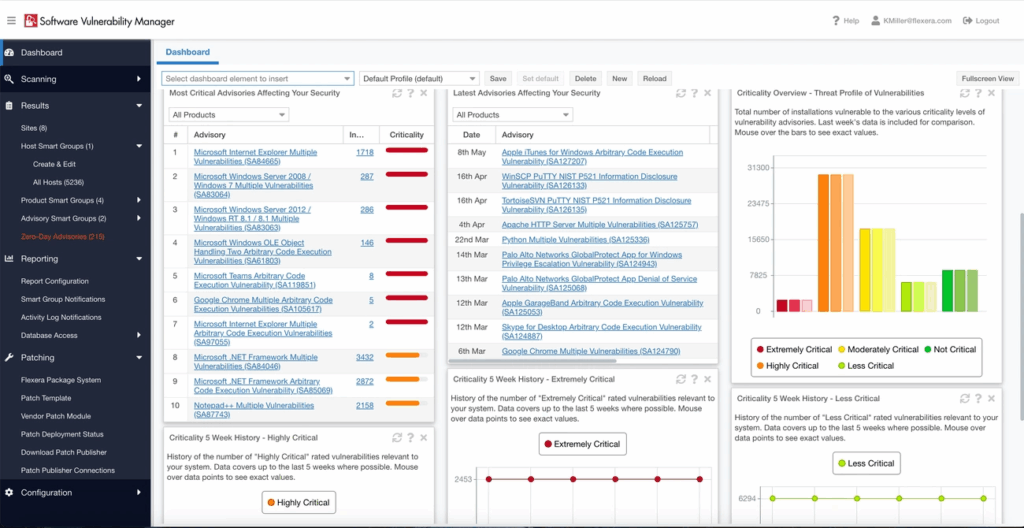
Image Source: Flexera
Many organizations use the simple scanning features of corporate software inspector. Yet several powerful features remain unexplored. These unused functions can substantially improve security posture and make vulnerability management processes easier in enterprise environments.
Real-time CVE Mapping with Flexera Vulnerability Database
Flexera Corporate Software Inspector’s effectiveness comes from its connection to Flexera’s vulnerability database. The system delivers verified information from the National Vulnerability Database (NVD) and vendor advisories. This gives organizations accurate and reliable vulnerability details.
The corporate software inspector uses Secunia Research’s verified vulnerability intelligence to check patch status and set remediation priorities. Public sources often have unverified data. The research team carefully reviews vulnerabilities and links known exploits to specific CVEs in advisories. Security teams can now focus on real threats instead of false positives.
Security vulnerability alerts arrive within one day of public disclosure. This quick notification gives security teams valuable time to address new vulnerabilities before exploitation. The database updates daily with verified information to protect against new threats.
Custom Risk Scoring Based on Asset Criticality
Organizations have access to extensive vulnerability data. Many fail to place this information in context within their environment. The Flexera Corporate Software Inspector provides advanced risk prioritization based on exploitability and asset criticality.
Organizations can create their own risk assessment framework with the customizable scoring system. This reflects their security posture and risk tolerance. Security teams can adjust risk factor values, control weights, and criticality levels. The result is a more accurate picture of risk in their environment.
Teams can add their asset values, operational impact assessments, and security measure weights into calculations. This creates a custom risk score that shows the organization’s actual risk profile rather than comparing it to unrelated businesses. The system categorizes threat scores by severity. Teams can focus on critical issues based on importance, exploitation likelihood, and overall vulnerability scores.
Integration with Microsoft SCCM and WSUS
The corporate software inspector’s smooth integration with existing Microsoft infrastructure is often overlooked. The solution works directly with Microsoft System Center Configuration Manager (SCCM) console and Windows Server Update Services (WSUS). This maximizes the value of these tools.
Security teams can manage all security updates and patches from one console. Organizations using Microsoft System Center 2012 or newer can deploy updates for thousands of third-party applications. They use the same interface and processes as Microsoft patches.
The integration setup between the corporate software inspector and WSUS server is straightforward. Administrators can schedule patches, track progress, and confirm successful fixes without switching consoles.
Enterprise environments benefit from reduced administrative work. The corporate software inspector makes use of existing infrastructure. This streamlines patch management for non-Microsoft products and removes the need for separate patch tools.
The corporate software inspector also scans authenticated software inventory across Windows, macOS, and Red Hat Enterprise Linux (RHEL). It covers more than 20,000 applications. This multi-platform support ensures consistent vulnerability management in various IT environments. It reduces potential gaps in discovery and patch coverage.
Automated Patch Management for Third-Party Applications
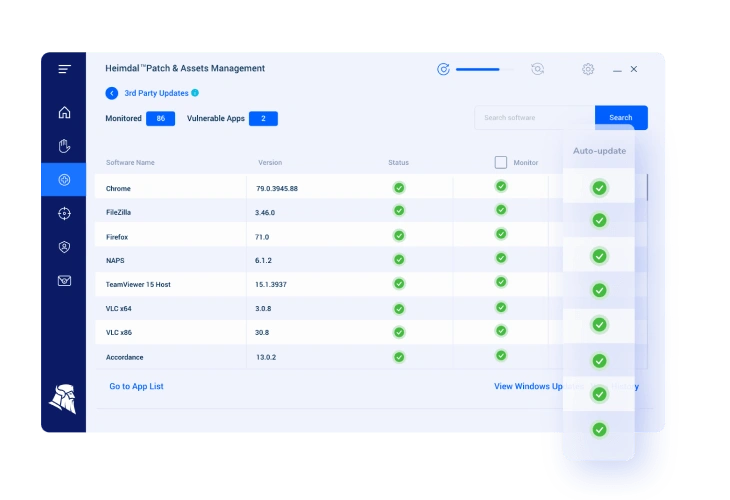
Image Source: Heimdal Security
Third-party application vulnerabilities remain a major challenge. Studies reveal that more than 80% of network vulnerabilities come from unpatched non-Microsoft applications. Flexera Corporate Software Inspector solves this problem with automated patch management that does more than just detect vulnerabilities.
Pre-configured Patch Packages for 20,000+ Apps
Corporate Software Inspector leads the market with tested patch packages for over 20,000 applications. This coverage is much higher than what other solutions provide. These tested packages help IT teams save time since they don’t need to configure and test patches manually.
The solution stands out because of its extensive library of ready-made patches for non-Microsoft applications on Windows platforms. Each patch goes through detailed testing before release to keep production environments running smoothly.
These packages work right out of the box, giving administrators peace of mind during deployment. The system takes care of complex patch packaging so IT teams can plan their deployment strategy better.
The system adapts to different needs, letting users create custom patch packages for applications in multiple languages. Adobe product patches serve as a good example – users can set them up with different language options based on what their organization needs.
Patch Deployment Scheduling via SCCM Console
Corporate Software Inspector really shines with its direct connection to Microsoft System Center Configuration Manager (SCCM) and Windows Server Update Services (WSUS). Administrators can now handle all security updates, including non-Microsoft ones, from one familiar place.
The Flexera Package System shows up right inside System Center Configuration Manager, making patch management simple. This integration lets administrators:
- Select vulnerable applications identified by Corporate Software Inspector
- Access pre-configured patches for these applications
- Schedule deployment times based on organizational needs
- Define deployment settings and user experience options
- Configure download settings and distribution points
Organizations can get more value from their existing infrastructure while improving their patch management. The integration works with both cloud and on-premises setups through a documented, role-based solution.
Progress Monitoring and Rollback Options
Corporate Software Inspector keeps track of everything during the patching process. Administrators can check if patches worked and spot any problems quickly.
The system’s authenticated scanning gives accurate, current results. These scans create detailed reports showing how well patches are working and check if all applications are up to date. This creates a clear record for security compliance.
Sometimes patches can cause problems, so Corporate Software Inspector includes rollback options. Not every patch can be rolled back, but the system clearly shows which ones can. This helps administrators undo problematic updates when needed, especially on critical systems that can’t afford downtime.
The patch deployment follows clear steps: choosing patches based on vulnerabilities, checking them with pre-configured packages, scheduling through SCCM or WSUS, and watching the progress closely. This approach ensures patches work well across the organization.
Compliance Reporting Features You Might Be Ignoring
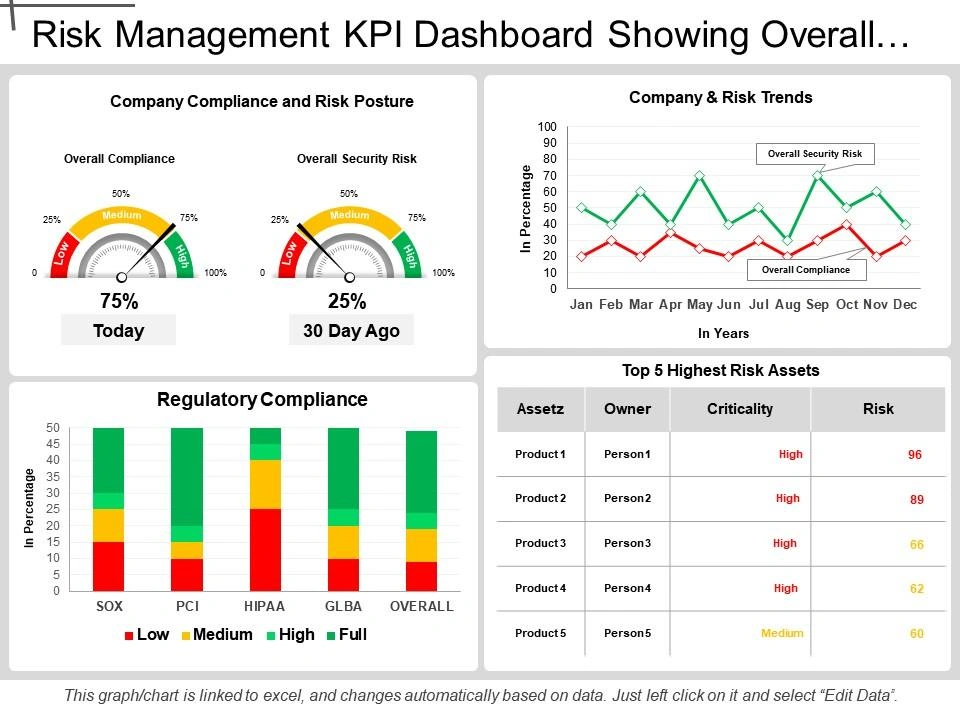
Image Source: SlideTeam
Security teams often overlook compliance reporting capabilities of corporate software inspector. They focus on vulnerability detection and patch management instead. Many organizations use these tools just for security and miss out on their regulatory compliance benefits.
Automated Audit-Ready Reports for ISO 27001 and HIPAA
Corporate Software Inspector turns compliance documentation into a smooth automated process. The system creates detailed, audit-ready reports that meet strict standards for ISO 27001, NIST Cybersecurity Framework, and HIPAA. Teams no longer need to rush before audits because the software keeps track of patch cycles, version status, and fixes automatically.
Research shows that companies using automated compliance reporting tools like corporate software inspector cut their audit prep time by 70-80%. Security teams can now generate reports instantly to show they meet specific regulatory standards. They don’t have to gather evidence from different systems anymore. These reports contain time-stamped, verifiable records of all software inventory and patch deployment work.
Healthcare companies must follow HIPAA rules. The corporate software inspector offers special reports that show security controls for protected health information. The tool also helps with ISO 27001 by tracking information security management. All records stay safe in ISO 27001-certified data centers.
Risk Exposure Metrics for Executive Dashboards
The system can create business-focused risk metrics that executives understand easily. These dashboards show security data in business terms instead of technical reports:
- Percentage of business-critical assets with unpatched vulnerabilities
- Average time from vulnerability discovery to remediation
- Compliance posture scores for relevant frameworks
- Security incident trends and financial impact
Executives get immediate risk updates through these dashboards. They can understand the security situation without diving into technical details. The corporate software inspector agent feeds fresh data to these dashboards to keep metrics current and useful.
Companies start seeing returns on these dashboard features within 3-6 months. Full benefits show up in 12-18 months as teams get better at handling vulnerabilities. Companies using these metrics save up to 20% on IT costs by optimizing their systems and resources.
Documentation Management for Regulatory Reviews
Good documentation management helps regulatory reviews succeed. Many companies don’t use the corporate software inspector’s full potential in this area. The system keeps detailed records of everything done with software assets, including changes, approvals, and access logs.
The tool offers these key documentation features:
- Version control that keeps only current, approved documents available
- Audit trails recording every software asset action
- Metadata tagging for quick document filtering
- Automated review cycles that prevent unauthorized changes
The tool helps companies keep complete compliance records without manual spreadsheets or scattered folders. Inspectors can get document history or compliance proof right away. Staff members don’t need to search through different systems anymore.
This central approach makes compliance management simpler and more reliable. Companies cut their reporting time by over 50%. Security teams can focus on fixing vulnerabilities instead of paperwork.
Advanced Scanning and Inventory Intelligence
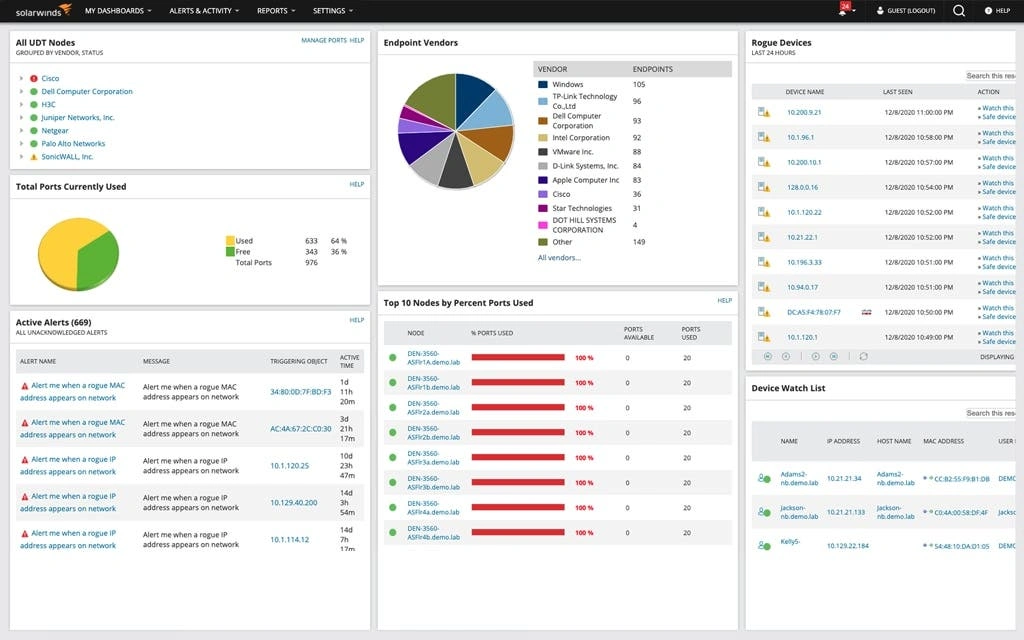
Image Source: SolarWinds
The scanning technology that powers corporate software inspector is one of its most advanced features, yet companies don’t use it to its full potential. Many organizations don’t tap into these capabilities, which limits their view of software vulnerabilities in a variety of environments.
Authenticated Software Inventory Scanning
Corporate software inspector takes a different approach than regular vulnerability scanners. It runs non-intrusive authenticated scans of systems. This method helps identify all installed programs and plugins by checking actual files on the system, not just registry entries or installation logs.
The scanner checks all executables—including EXE, OCX, and DLL files—using Secunia Research’s file signatures. The system then associates program data with Flexera’s product database to create an accurate software inventory. These authenticated scans give precise results with very few false positives.
While other solutions only check surface-level details, Flexera corporate software inspector agent creates detailed profiles of installed software by analyzing file structures, signatures, and metadata. This method gives unmatched accuracy and produces practical results with specific risk ratings based on Secunia Advisories. This scanning intelligence serves as the base for all future vulnerability management tasks.
Version Tracking Across Windows, macOS, and RHEL
Corporate software inspector offers excellent visibility across platforms through its multi-environment scanning features. The system supports authenticated software inventory scanning on:
- Microsoft Windows environments with full coverage
- Apple macOS systems for unified visibility
- Red Hat Enterprise Linux (RHEL) platforms for complete oversight
The system tracks detailed versions of all software it finds. Each scan records the full installation path, version details, and links to available patches. This version tracking helps identify outdated software and potential security gaps.
The scanner also flags programs that vendors no longer support. This feature helps companies identify software they should replace due to missing security updates, which reduces potential security risks.
Asset Mapping with CMDB Integration
Corporate software inspector adds value through its smooth Configuration Management Database (CMDB) integration. Special connectors let the system update and maintain the CMDB with accurate, standardized data about hardware and software assets.
After integration, corporate software inspector keeps watching systems and updates the CMDB daily with current software configurations. This automatic process solves a key problem in asset management—keeping data current without manual work.
The integration standardizes asset identification, naming rules, and data cleaning. These standards ensure consistent asset records throughout the organization, which leads to better data quality and decision-making.
Companies using this CMDB integration see major improvements. Service tickets get resolved up to 25% faster because of better ticket data. The service desk works faster when the system automatically adds details about software versions and hardware environments.
The mapping also helps with IT Financial Management by adding usage data to assets, which enables accurate billing to business units. This financial insight helps companies optimize their software spending and cut unnecessary license costs.
Security Alerting and Threat Intelligence Integration
The corporate software inspector stands out in threat management through its quick notification systems, yet many organizations don’t use it fully. The platform goes beyond finding vulnerabilities and provides smart alerts that turn defensive security into active protection strategies.
Custom Alerting for Critical Vulnerabilities
Security teams can build custom notification systems with the corporate software inspector based on specific vulnerability traits. Teams can set up alerts by sorting and grouping data that matters most to their company’s products, devices, or Secunia Advisories. This setup helps teams stay focused on crucial issues without getting overwhelmed by too many alerts.
The system sends both email and SMS alerts right away when security events happen. This feature proves vital for critical systems where a few minutes of exposure could lead to major breaches. A custom risk scoring system ranks alerts by how easily they can be exploited and how important the assets are. This ensures teams tackle the most dangerous vulnerabilities first.
Threat Advisory Feeds from NVD and Vendor Sources
The corporate software inspector keeps its vulnerability database fresh with checked information from trusted sources. The intelligence network includes:
- Daily database updates with verified vulnerability details
- Threat advisory integration that enables active security measures
- CVE mapping against known vulnerabilities for full coverage
- Risk scoring based on how easily exploits work and their effects
The National Vulnerability Database (NVD) integration makes this intelligence gathering better. The corporate software inspector improves raw NVD data through checks and context, making it ready to use in company environments.
SIEM Integration for Real-Time Correlation
The system’s most powerful but unused feature lets it work with Security Information and Event Management (SIEM) systems. This connection provides vulnerability data for security and compliance reports in existing security operations centers.
The corporate software inspector feeds vital data to SIEM tools when set up properly. Security analysts can then link vulnerability data with other security events. This connection turns separate vulnerability information into useful security insights and shows possible attack paths that might stay hidden otherwise.
Organizations using this setup report much better threat detection. One government group used these solutions to track assets, check for vulnerabilities, and fix critical application patches. This stopped attackers from using potential weak points.
Deployment Best Practices for Corporate Software Inspector Agent
Organizations need careful planning and reliable infrastructure preparation to deploy the corporate software inspector agent successfully. The right technical requirements, access configurations, and integration opportunities will help maximize their vulnerability management investment.
System Requirements for Flexera Corporate Software Inspector Agent
The corporate software inspector agent needs specific system requirements to perform optimally. Workstations must have Internet Explorer 11 or higher, though users can view scan results in other browsers. A minimum resolution of 1024×768 and an active internet connection are essential. The system’s first-party cookie settings and session cookies must be enabled. The agent works with Windows, macOS, and Red Hat Enterprise Linux (RHEL) environments. This compatibility gives organizations flexibility with their infrastructure choices.
Network Access and Privilege Configuration
The agent’s deployment success depends heavily on network configuration. The firewall/proxy configuration must whitelist specific addresses including crl.verisign.net, crl.thawte.com, and various Secunia domains. Authentication options become crucial especially when network proxies block LocalSystem connections. The agent can run under a different service account by configuring runAsUsername and runAsPassword. Proxy environments need additional variables like proxyUsername, proxyPassword, proxyHost, and proxyPort to connect with Flexera servers.
Integration with ITSM Tools like ServiceNow
The corporate software inspector agent works best when connected to IT Service Management platforms like ServiceNow, creating a complete vulnerability management ecosystem. Critical vulnerability detection leads to automatic ticket creation that ensures quick remediation workflows. The systems’ synchronization enables smooth vulnerability data transfer and eliminates communication gaps. Support teams and incident response personnel benefit from optimized workflows, as service requests automatically create corresponding incidents in the ITSM platform. The integration with configuration management databases (CMDB) enhances asset tracking and provides context that speeds up issue resolution.
Conclusion
Organizations face sophisticated cybersecurity threats daily. Software inspector solutions have become crucial tools in this battle. This piece explores several powerful features that can boost an organization’s security posture, yet many teams don’t use them fully.
Flexera Corporate Software Inspector excels through its detailed vulnerability management capabilities. Security teams can prioritize threats based on business effects rather than generic metrics, thanks to up-to-the-minute CVE mapping and custom risk scoring. The solution works smoothly with existing Microsoft infrastructure and simplifies patch management processes while maximizing IT investments.
Third-party applications often account for 80% of network vulnerabilities. The automated patch management system tackles this security gap head-on. Pre-configured patch packages for over 20,000 applications reduce administrative work and ensure consistent protection in various environments.
The system turns regulatory requirements into automated processes through its compliance reporting features. Companies that use these capabilities cut their audit preparation time by 70-80%. This allows security teams to focus on stopping threats instead of paperwork.
Advanced scanning gives unprecedented visibility across Windows, macOS, and RHEL platforms. This multi-platform intelligence creates a detailed asset inventory that forms the base for effective vulnerability management. CMDB integration adds accurate software data to IT service management, which speeds up issue resolution and leads to better decisions.
Partial implementation of these features leaves security gaps. The true value comes from using the complete feature set, from finding vulnerabilities to verifying fixes. Organizations that implement detailed vulnerability management through Corporate Software Inspector see remarkable results – an 80% reduction in attack surface risk and 50% fewer unpatched vulnerabilities within 90 days.
Cyber threats keep evolving. Organizations need to make full use of every security tool available. Corporate Software Inspector offers a solution that goes beyond simple scanning, though many teams overlook its most powerful features. Security leaders should assess their current setup and think about expanding their usage to include these overlooked but vital capabilities.
FAQs
1. What are the key benefits of using Flexera Corporate Software Inspector?
Flexera Corporate Software Inspector offers real-time vulnerability mapping, custom risk scoring, automated patch management for third-party applications, and comprehensive compliance reporting. It can reduce attack surface risk by 80% and unpatched vulnerabilities by 50% within 90 days of implementation.
2. How does Corporate Software Inspector handle patch management for non-Microsoft applications?
The solution provides pre-configured patch packages for over 20,000 applications, integrates with Microsoft SCCM and WSUS for deployment, and offers progress monitoring and rollback options. This streamlines the patching process for third-party applications, which often account for 80% of network vulnerabilities.
3. What compliance reporting features does Corporate Software Inspector offer?
It generates automated, audit-ready reports for standards like ISO 27001 and HIPAA, provides risk exposure metrics for executive dashboards, and offers comprehensive documentation management for regulatory reviews. These features can reduce audit preparation time by 70-80%.
4. How does the scanning technology in Corporate Software Inspector work?
The software uses authenticated scanning to examine all executables on a system, correlating program metadata with Flexera’s product database for accurate software inventory. It supports scanning across Windows, macOS, and RHEL platforms, providing detailed version tracking and end-of-life software detection.
5. Can Corporate Software Inspector integrate with other IT management tools?
Yes, it integrates with Configuration Management Databases (CMDB) for asset mapping, Security Information and Event Management (SIEM) systems for real-time threat correlation, and IT Service Management (ITSM) tools like ServiceNow for automated ticket creation and workflow management.
Enterprise AI Strategy & Implementation Discovery Call
Scope practical AI workflows, human-in-the-loop governance, and measurable delivery milestones with Tesseract Consulting.